BACK
UI UX - Figma
UI UX - Figma
Dashboard
Dashboard


MY ROLE
Two years ago, the dashboard lacked any customization features. Its sole purpose was to allow users to create widgets and access the dashboard to view only the widgets they had created.
One day, I was tasked with designing a more intuitive and user-friendly dashboard. One of the great aspects of this project was that the product manager provided me with a reference to guide my design. The reference product was Zoho People, which served as a helpful starting point for creating a better dashboard experience.
RESULTS
After the discussion, I began analyzing the Zoho People product to understand how it works. As I delved deeper, I found it to be highly intuitive and user-friendly, which left a lasting impression on me. Inspired by this, I set out to design wireframes for all the necessary functions, addressing the existing use cases with a more refined UX approach. This redesign not only enhanced the product’s functionality but also aligned it seamlessly with modern user expectations, making it a more efficient and delightful experience for users.
Previous Design
Previous Design
Updated Design
Updated Design
Due to the file size limitations, I couldn't showcase the complete updated design in the video.
Due to the file size limitations, I couldn't showcase the complete updated design in the video.
Final Designs
Final Designs

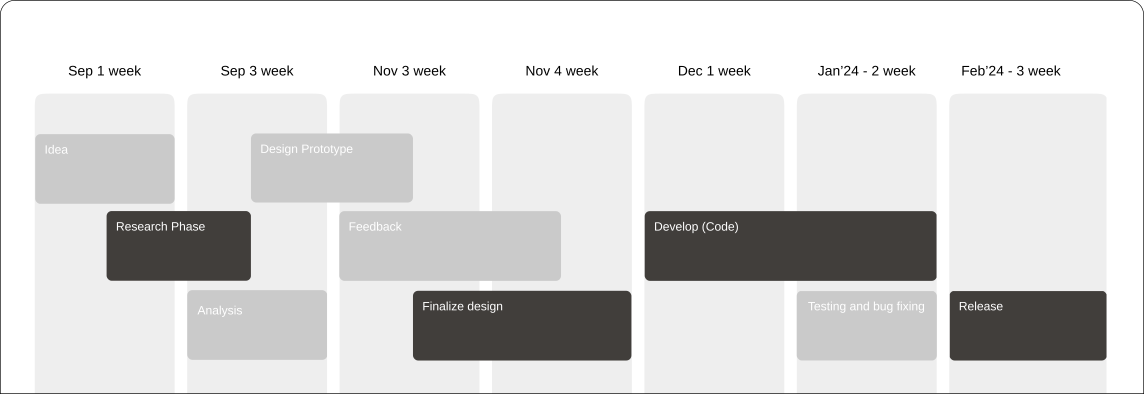
Design process
To kick off the Contify Insights Module project, I conducted an in-depth discovery phase to understand the company's objectives, target users, and specific requirements. This comprehensive research enabled me to align the design concept with Contify's goals and vision, ensuring a user-centric and effective solution.
Research
& Ideation
step 001
Design &
Prototype
step 002
Dev &
UI Testing
step 003
Testing &
Bug Fixing
step 003
Release if Looks Good
step 003
01 - Research
Interview
Brainstorming
Empathy Map
Competitor Analysis
User journey
02 - Design
Brand identity
Design Sytem
Design Flow
General Prototype
Feedback
03 - Develop
Layout Revision
Translate from UI to code
Testing
Audit
Feedback
04 - Testing
Usability Testing
Design Revision
Audit
Feedback
Assets Documentation
05 - Release
General Testing
Testcase Creation
Flow Creation from QA
QA documentation
24 week
Visual Design & Prototype
The design prominently features Contify's brand color palette, ensuring a cohesive and visually appealing user experience throughout the Insights module.
Style Guide
Primary Colors
Secondary Colours
Tertiary (Gray Colors)
Typography
Aa
IBM Plex
IBM Plex
24px
Heading 2
IBM Plex
16px
Heading 3
IBM Plex
14px
Heading 4
Visual Design & Prototype
The design prominently features Contify's brand color palette, ensuring a cohesive and visually appealing user experience throughout the Insights module.
Style Guide
Primary Colors
Secondary Colours
Tertiary (Gray Colors)
Typography
Aa
IBM Plex
IBM Plex
24px
Heading 2
IBM Plex
16px
Heading 3
IBM Plex
14px
Heading 4
Visual Design & Prototype
The design prominently features Contify's brand color palette, ensuring a cohesive and visually appealing user experience throughout the Insights module.
Style Guide
Primary Colors
Secondary Colours
Tertiary (Gray Colors)
Typography
Aa
IBM Plex
IBM Plex
24px
Heading 2
IBM Plex
16px
Heading 3
IBM Plex
14px
Heading 4
Visual Design & Prototype
The design prominently features Contify's brand color palette, ensuring a cohesive and visually appealing user experience throughout the Insights module.
Style Guide
Primary Colors
Secondary Colours
Tertiary (Gray Colors)
Typography
Aa
IBM Plex
IBM Plex
24px
Heading 2
IBM Plex
16px
Heading 3
IBM Plex
14px
Heading 4
Prototype
To view the complete prototype of the Contify Insights module, please follow this link. The prototype showcases the design, including user flows and key features. Explore it to get a comprehensive understanding of the user experience.
Prototype
To view the complete prototype of the Contify Insights module, please follow this link. The prototype showcases the design, including user flows and key features. Explore it to get a comprehensive understanding of the user experience.
Prototype
To view the complete prototype of the Contify Insights module, please follow this link. The prototype showcases the design, including user flows and key features. Explore it to get a comprehensive understanding of the user experience.
Prototype
To view the complete prototype of the Contify Insights module, please follow this link. The prototype showcases the design, including user flows and key features. Explore it to get a comprehensive understanding of the user experience.
Design process
To kick off the Contify Insights Module project, I conducted an in-depth discovery phase to understand the company's objectives, target users, and specific requirements. This comprehensive research enabled me to align the design concept with Contify's goals and vision, ensuring a user-centric and effective solution.
Research & Ideation
step 01
Design & Prototype
step 02
Dev & UI Testing
step 03
Testing & Bug Fixing
step 03
Release if Looks Good
step 03
01 - Research
Interview
Brainstorming
Empathy Map
Competitor Analysis
User journey
02 - Design
Brand identity
Design Sytem
Design Flow
General Prototype
Feedback
03 - Develop
Layout Revision
Translate from UI to code
Testing
Audit
Feedback
04 - Testing
Usability Testing
Design Revision
Audit
Feedback
Assets Documentation
05 - Release
General Testing
Testcase Creation
Flow Creation from QA
QA documentation
24 week