BACK
UI UX - Adobe XD
UI UX - Adobe XD
Setup Page for Insights Module
Setup Page for Insights Module


MY ROLE
The Insight Setup page is the foundation of the Insights Module; without it, users won't be able to see any objects on the Insights Platform. Before initiating the design process, the product manager, CEO, and I discussed the requirements to understand how the system would work and how to create objects and object groups for the Insights Module. With this understanding, it was easier to design the process for creating objects in Insights. My role was to conceive and design the entire process for creating these objects.
RESULTS
This process works seamlessly for creating objects, object groups, and KIQs. We are currently refining it to provide an even smoother experience for clients and prospects.
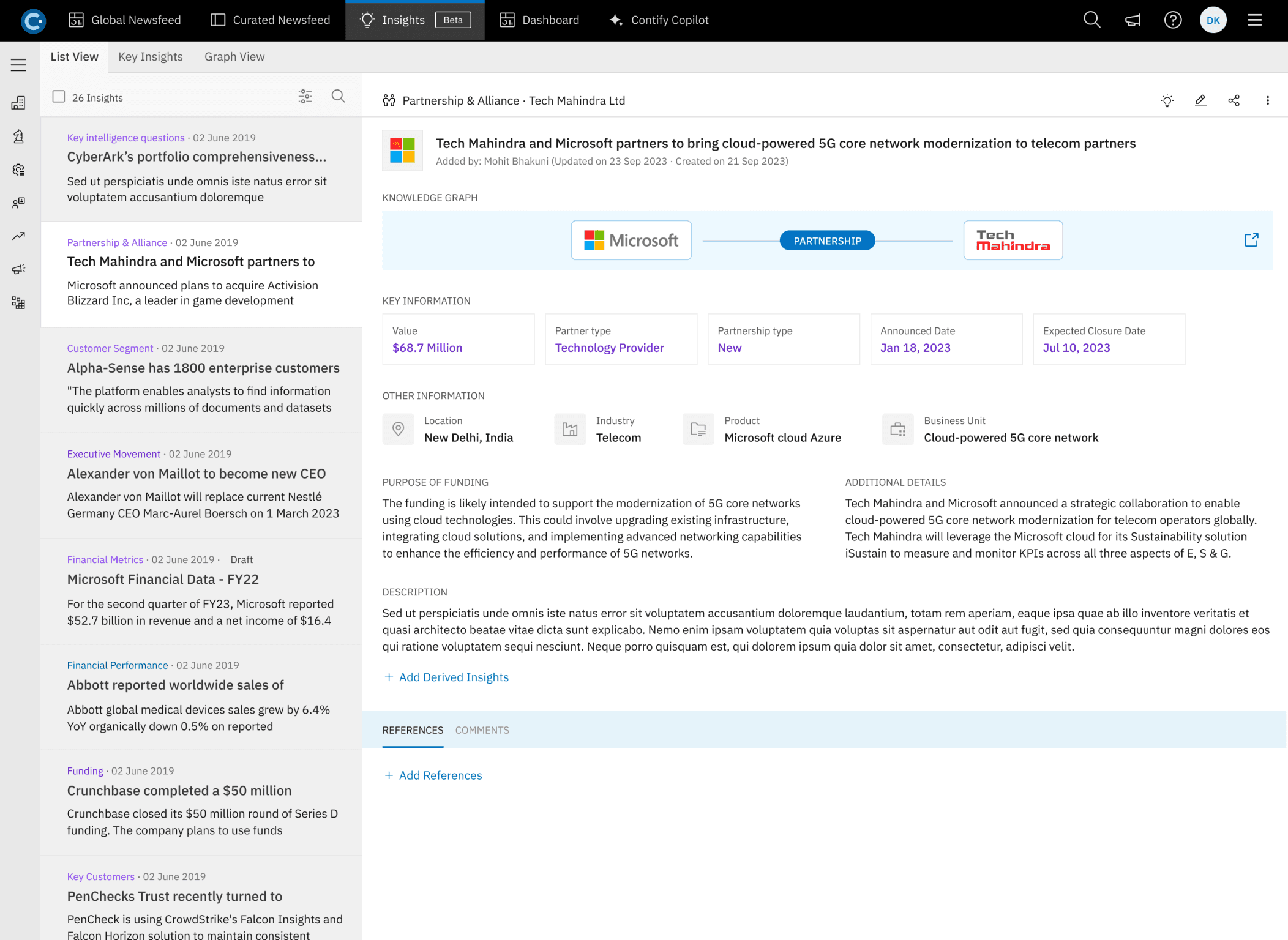
The Insights Setup page on the Contify platform is designed to provide users with a seamless and efficient way to configure and customize their insights. This page is integral for users to create and define their insights objects and object groups.
The Insights Setup page on the Contify platform is designed to provide users with a seamless and efficient way to configure and customize their insights. This page is integral for users to create and define their insights objects and object groups.
The Challenge or Problem Statement
The Challenge or Problem Statement
This project involved developing the setup page for the Insights module, which is essential for creating and managing objects within the module. Without this setup page, users cannot create or organize objects or object groups, making it a critical component of the Insights module.
This project involved developing the setup page for the Insights module, which is essential for creating and managing objects within the module. Without this setup page, users cannot create or organize objects or object groups, making it a critical component of the Insights module.
Final Designs
Final Designs
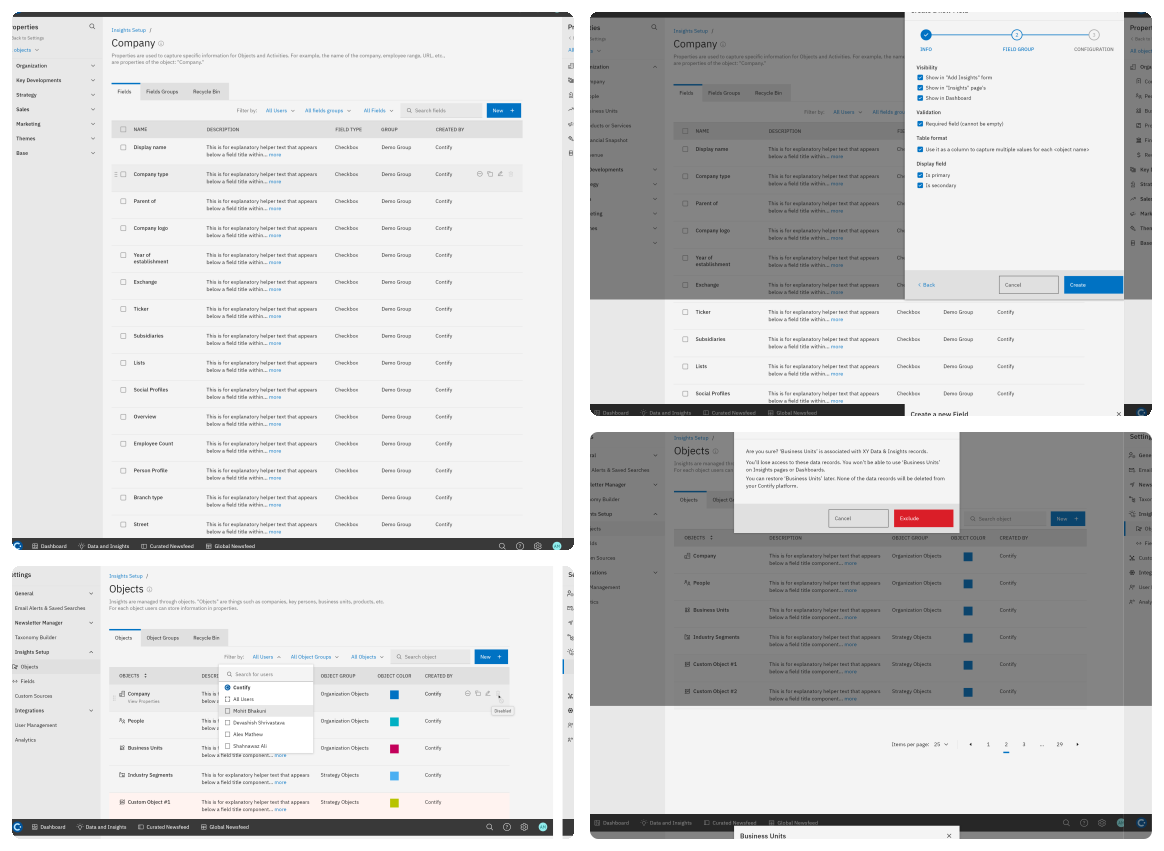
Here are several images showcasing Insights setup pages, highlighting its features, interface, and capabilities, which demonstrate how it assists users in retrieving information, analyzing data, and interacting with various elements within the platform.
Here are several images showcasing Insights setup pages, highlighting its features, interface, and capabilities, which demonstrate how it assists users in retrieving information, analyzing data, and interacting with various elements within the platform.
User Flow
User Flow
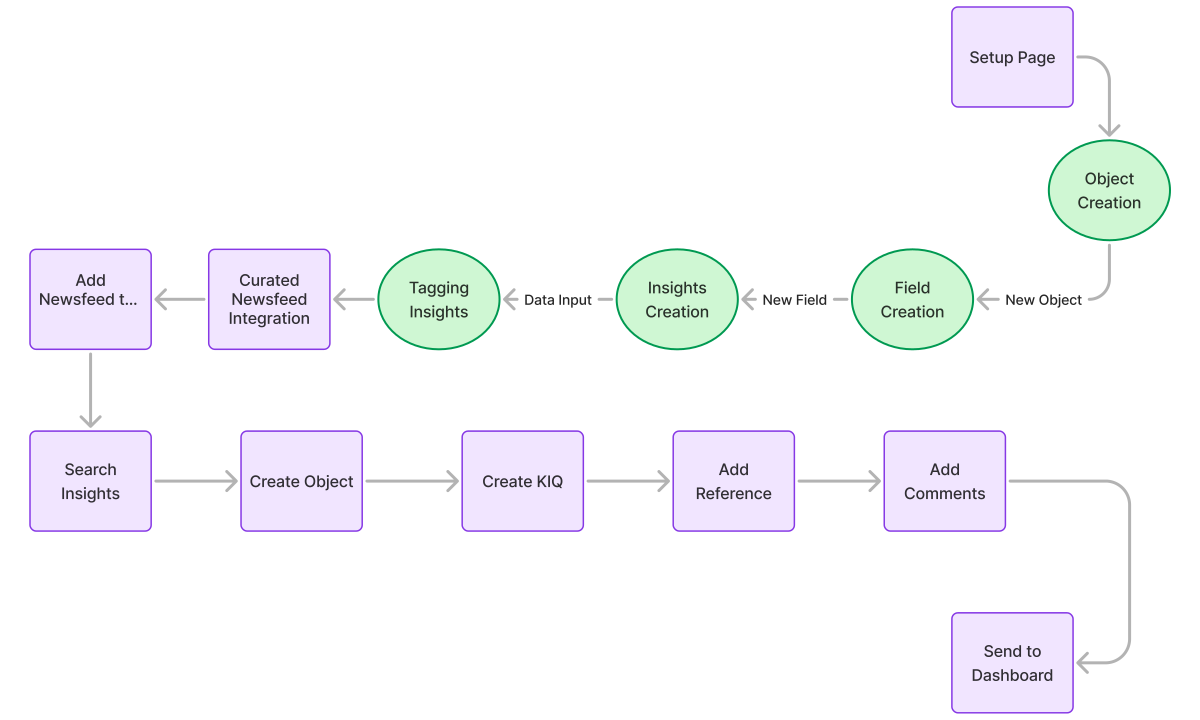
The "Insights Setup Page User Flow" outlines the sequence of steps and interactions a user follows to configure and set up the Insights module, including the navigation through various settings, input requirements, and the overall process of establishing the module to ensure it functions effectively and meets user needs.
The "Insights Setup Page User Flow" outlines the sequence of steps and interactions a user follows to configure and set up the Insights module, including the navigation through various settings, input requirements, and the overall process of establishing the module to ensure it functions effectively and meets user needs.
Design process
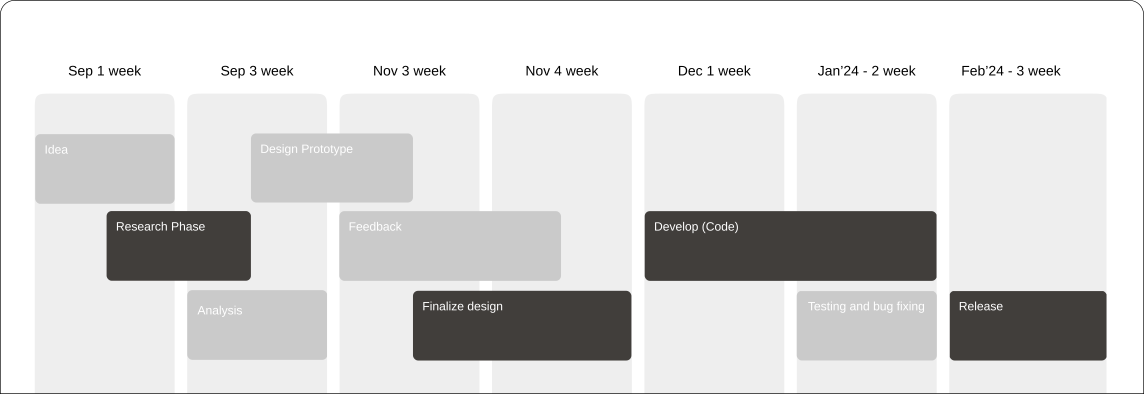
To kick off the Contify Insights Module project, I conducted an in-depth discovery phase to understand the company's objectives, target users, and specific requirements. This comprehensive research enabled me to align the design concept with Contify's goals and vision, ensuring a user-centric and effective solution.
Research & Ideation
step 01
Design & Prototype
step 02
Dev & UI Testing
step 03
Testing & Bug Fixing
step 03
Release if Looks Good
step 03
01 - Research
Interview
Brainstorming
Empathy Map
Competitor Analysis
User journey
02 - Design
Brand identity
Design Sytem
Design Flow
General Prototype
Feedback
03 - Develop
Layout Revision
Translate from UI to code
Testing
Audit
Feedback
04 - Testing
Usability Testing
Design Revision
Audit
Feedback
Assets Documentation
05 - Release
General Testing
Testcase Creation
Flow Creation from QA
QA documentation
24 week
Design process
To kick off the Contify Insights Module project, I conducted an in-depth discovery phase to understand the company's objectives, target users, and specific requirements. This comprehensive research enabled me to align the design concept with Contify's goals and vision, ensuring a user-centric and effective solution.
Research & Ideation
step 01
Design & Prototype
step 02
Dev & UI Testing
step 03
Testing & Bug Fixing
step 03
Release if Looks Good
step 03
01 - Research
Interview
Brainstorming
Empathy Map
Competitor Analysis
User journey
02 - Design
Brand identity
Design Sytem
Design Flow
General Prototype
Feedback
03 - Develop
Layout Revision
Translate from UI to code
Testing
Audit
Feedback
04 - Testing
Usability Testing
Design Revision
Audit
Feedback
Assets Documentation
05 - Release
General Testing
Testcase Creation
Flow Creation from QA
QA documentation
24 week
Design process
To kick off the Contify Insights Module project, I conducted an in-depth discovery phase to understand the company's objectives, target users, and specific requirements. This comprehensive research enabled me to align the design concept with Contify's goals and vision, ensuring a user-centric and effective solution.
Research & Ideation
step 01
Design & Prototype
step 02
Dev & UI Testing
step 03
Testing & Bug Fixing
step 03
Release if Looks Good
step 03
01 - Research
Interview
Brainstorming
Empathy Map
Competitor Analysis
User journey
02 - Design
Brand identity
Design Sytem
Design Flow
General Prototype
Feedback
03 - Develop
Layout Revision
Translate from UI to code
Testing
Audit
Feedback
04 - Testing
Usability Testing
Design Revision
Audit
Feedback
Assets Documentation
05 - Release
General Testing
Testcase Creation
Flow Creation from QA
QA documentation
24 week
Design process
To kick off the Contify Insights Module project, I conducted an in-depth discovery phase to understand the company's objectives, target users, and specific requirements. This comprehensive research enabled me to align the design concept with Contify's goals and vision, ensuring a user-centric and effective solution.
Research & Ideation
step 01
Design & Prototype
step 02
Dev & UI Testing
step 03
Testing & Bug Fixing
step 03
Release if Looks Good
step 03
01 - Research
Interview
Brainstorming
Empathy Map
Competitor Analysis
User journey
02 - Design
Brand identity
Design Sytem
Design Flow
General Prototype
Feedback
03 - Develop
Layout Revision
Translate from UI to code
Testing
Audit
Feedback
04 - Testing
Usability Testing
Design Revision
Audit
Feedback
Assets Documentation
05 - Release
General Testing
Testcase Creation
Flow Creation from QA
QA documentation
24 week
Visual Design & Prototype
The design prominently features Contify's brand color palette, ensuring a cohesive and visually appealing user experience throughout the Insights module.
Style Guide
Primary Colors
Secondary Colours
Tertiary (Gray Colors)
Typography
Aa
IBM Plex
IBM Plex
24px
Heading 2
IBM Plex
16px
Heading 3
IBM Plex
14px
Heading 4
Visual Design & Prototype
The design prominently features Contify's brand color palette, ensuring a cohesive and visually appealing user experience throughout the Insights module.
Style Guide
Primary Colors
Secondary Colours
Tertiary (Gray Colors)
Typography
Aa
IBM Plex
IBM Plex
24px
Heading 2
IBM Plex
16px
Heading 3
IBM Plex
14px
Heading 4
Visual Design & Prototype
The design prominently features Contify's brand color palette, ensuring a cohesive and visually appealing user experience throughout the Insights module.
Style Guide
Primary Colors
Secondary Colours
Tertiary (Gray Colors)
Typography
Aa
IBM Plex
IBM Plex
24px
Heading 2
IBM Plex
16px
Heading 3
IBM Plex
14px
Heading 4
Visual Design & Prototype
The design prominently features Contify's brand color palette, ensuring a cohesive and visually appealing user experience throughout the Insights module.
Style Guide
Primary Colors
Secondary Colours
Tertiary (Gray Colors)
Typography
Aa
IBM Plex
IBM Plex
24px
Heading 2
IBM Plex
16px
Heading 3
IBM Plex
14px
Heading 4
Prototype
To view the complete prototype of the Contify Insights module, please follow this link. The prototype showcases the design, including user flows and key features. Explore it to get a comprehensive understanding of the user experience.
Prototype
To view the complete prototype of the Contify Insights module, please follow this link. The prototype showcases the design, including user flows and key features. Explore it to get a comprehensive understanding of the user experience.
Prototype
To view the complete prototype of the Contify Insights module, please follow this link. The prototype showcases the design, including user flows and key features. Explore it to get a comprehensive understanding of the user experience.
Prototype
To view the complete prototype of the Contify Insights module, please follow this link. The prototype showcases the design, including user flows and key features. Explore it to get a comprehensive understanding of the user experience.